ErosBlog

The Sex Blog Of Record


ErosBlog posts containing "pornocalypse"

 
July 1st, 2013 -- by Bacchus

Adult Blogger Deathwatch

Well, today’s the big day — the day that Google has announced it will start deleting adult Blogger (blogspot.com) blogs that have any “monetization of adult content” on them. Since there’s no telling how Google defines “adult” or “monetization” and no way to predict how aggressively they will pursue this campaign, only time will tell how broad and deep the casualties will be.

Hence this post. I’m hoping to use the comments here for people to aggregate information on our losses in the sex blogging community. If you’ve lost an adult blog to Google’s deletion campaign (your own or a favorite browsing destination) please post the name, defunct link, and a few words of description in the comments.

Thanks!

Similar Sex Blogging:

 
June 1st, 2013 -- by Bacchus

Migrating Away From Tumblr

Lots of people (including me) started bitching after I discovered that Tumblr was locking away all the adult blogs behind a robots.txt designed to make them impossible to search or archive. Dr. Faustus has actually been doing something constructive about it, by exporting the best images from his Tumblr to individual self-hosted blog posts and this very fine thumbnail gallery. He explains his motives thusly:

In May 2013 Tumblr was acquired by Yahoo, a major corporation with at best a checkered record for dealing with its acquisitions. gallery of former tumblr content now on Erotic Mad Science as self-hosted content While Yahoo executives insist that they’re not going to screw up Tumblr, their past record combined with their obvious interest in having the site generate more corporate advertising revenue off the site makes me profoundly pessimistic about its future, especially with respect to adult content. And my pessimism is shared by some of the most astute and experienced observers in the adult Internet world. I fear the coming of a day when my tumblr is simply deleted for its violation of some vague “community standard,” which deletion will take place without warning or possibility of appeal. The content that I will have worked so hard to curate will be lost. I am determined to have it not be lost, and that is why I am keeping it here on my own site that I control.

Even if this ugly day never comes, there is still a major problem with Tumblr, which is that its content is simply not searchable. Tumblr blocks access to the crawlers of search engines and the Internet archive, probably to make itself more appealing to the corporate suits who are now its overlords. To me, that is not the Internet. The Internet means openness. It means having content that people who want to find can find. And it means backups for the historical record.

I will not stand to see the content I have curated hidden – tucked away as if it were something shameful – any more than I can stand to see it lost. I intend to save at least some of it, and that is the purpose of both my “Tumblr favorites” blogging and of this thumbnail index gallery.

Similar Sex Blogging:

 
May 20th, 2013 -- by Bacchus

How To Back Up Your Adult Tumblr Blog

As promised in my last post, this is the post in which I tell you how to make a full and complete backup of your porn Tumblr blog (or, really, any Tumblr). My goal for you is a set of files on your own hard drive that contains all the text and all the links and all the pictures (even the full-sized high-res click through ones) that you’ve got on your current Tumblr blog, all linked together in a way that you can open the site in your browser and browse through it just like you would online. This can be done. It’s not even very hard. And once you’ve got it done, you’ll have all the raw material you would need re-create your tumblr blog on some other hosting, if anything should happen to Tumblr or to your porn blog on Tumblr.

But why should you worry about that? Why might you need a Tumblr backup?

Well, as I write this, the news is official: Yahoo has purchased Tumblr for more than a billion dollars, cash. (Tumblr shareholders did not want any stinky Yahoo stock, which should tell you something.) The business press has been pointing out for awhile that Yahoo will need to deal with what the suits in the corporate/financial/advertising world consider to be Tumblr’s “porn problem“. And Yahoo itself has a terrible reputation for buying cool, trendy, successful websites, running them into the ground or neglecting them to death, and then shuttering them. (Remember Geocities? Shaddup, it was cool once. A long time ago…) As Violet Blue puts it in her Sex Tech column at ZDNet:

Yahoo! is well-known for misunderstanding the user base of properties it acquires and ruining – then scrapping – once-active and beloved properties.

But if Flickr’s rep [under Yahoo’s ownership] with poorly policing ‘art nudes’ is any hint of Tumblr’s fate, then we’re likely to see lots of once-happy users forced into confusing self-rating protocols, having their accounts banned and years of content deleted with no recourse, and a new content policy practically written by trolls who want the easiest path to shut down people they don’t like.

I, myself, have been speculating for a couple of weeks that Tumblr would soon start cracking down on its “porn problem”, starting with an idle prediction in my The Pornocalypse Comes For Us All post and expanding on it when I discovered (apparently before pretty much anybody else noticed) that Tumblr had started trying to hide all the porn blogs from Google. At first the specific reason was not clear, but in the last few days the drumbeat of anticipatory news about the Yahoo purchase began to make the pieces fall into place. It’s safe to speculate that Tumblr began trying to minimize its “porn problem” while the sale was being negotiated, and there’s a strong basis for concern that (swiftly or eventually) Yahoo will continue that process and attempt to rid the Tumblr ecosystem of porn blogs. Even if they don’t, their track record of failure with acquisitions is such that there’s a good chance that all of Tumblr will have failed or shut down within a few years. And, for people who aren’t following Bacchus’s First Law of The Internet, backups are really important.

Enough nattering. You want tools and instructions.

I’m going to show you two ways to do this, a best-but-somewhat-complex way and an easy-but-somewhat-incomplete way.

Complete Tumblr Backup Solution:

First, the good way, the one recommended by my friend and prolific Tumblr-user Dr. Faustus. I’ve tested this and it works. When you’re done, you’ll have a complete copy of your Tumblr site on your own hard drive that you could navigate with your internet unplugged.

The program you want is: HTTrack/WinHTTrack Website Copier. It’s an open-source free-software general utility for copying and mirroring websites, available for most current versions of Windows as well as for a wide variety of Linux/Unix flavors. The Windows version presents a fairly old-fashioned interface with a bunch of cryptic options, but most of them come pre-set with sensible defaults that you actually don’t need to mess with. Plus, there’s good documentation. (Note well: there are many other programs out there that can accomplish this job. I’m recommending this one because it works and because I’m aware of it; I’m not claiming it’s the best or the easiest.)

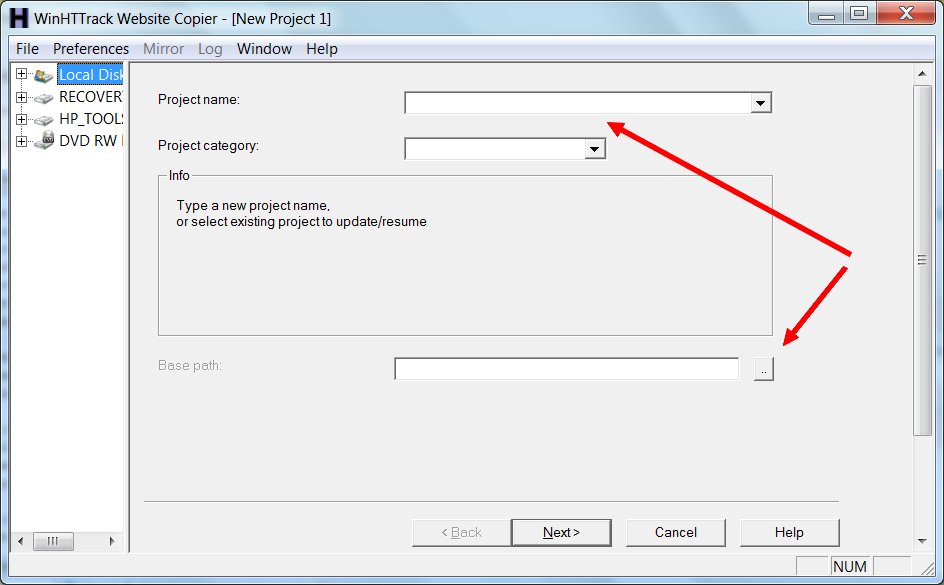
Download the software and install it, then run it. You’ll be presented with a welcome screen where you need to click “Next”. Then, this screen:
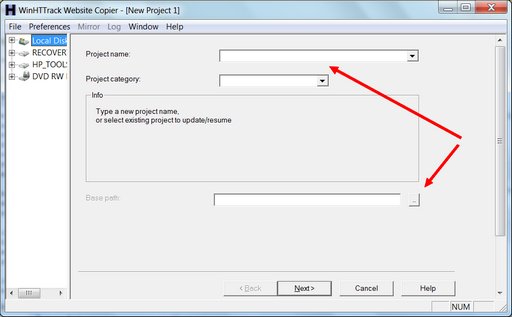
The arrows show you the two fields that need your attention. All you really need to do is give this backup project a name and tell the software where to save the backup. Then hit “Next”:
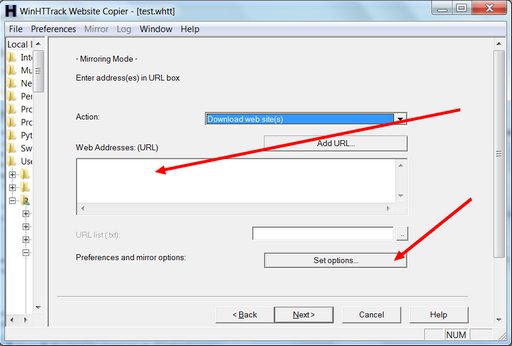
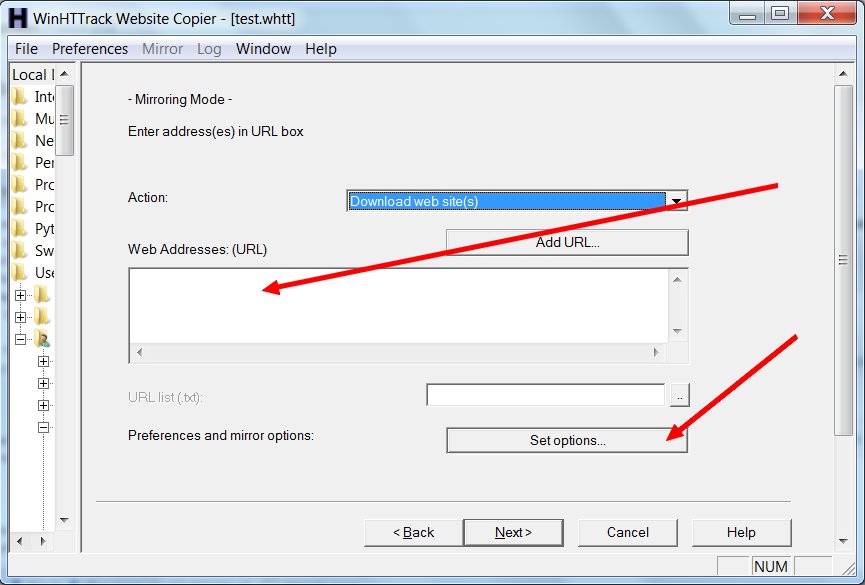
On this screen you need to type in the URL for the Tumblr you want to back up. It will be something like: http://yourtumblr.tumblr.com — and there’s one vital reason you need to press the “Set options” button. When you do, you’ll see this:
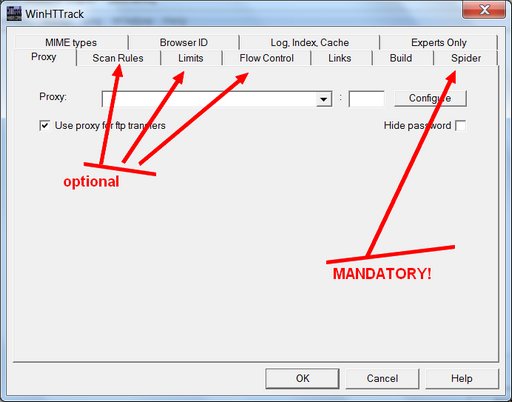
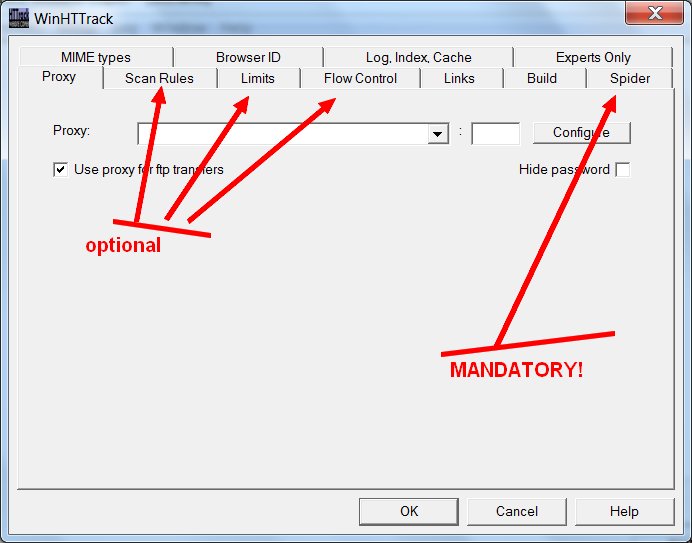
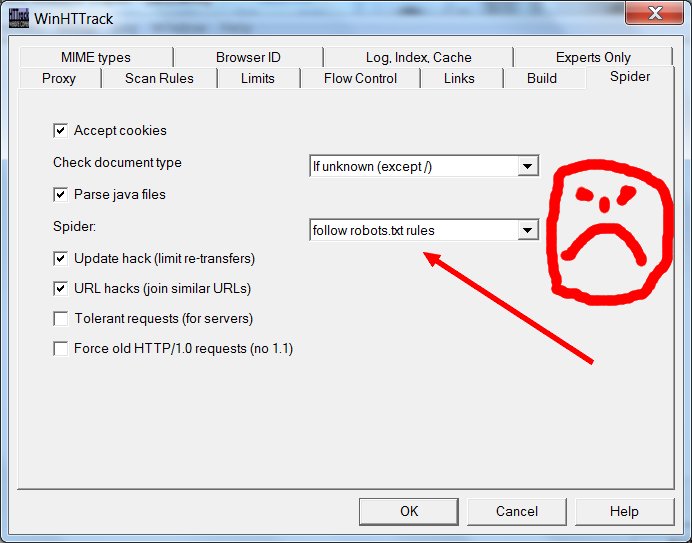
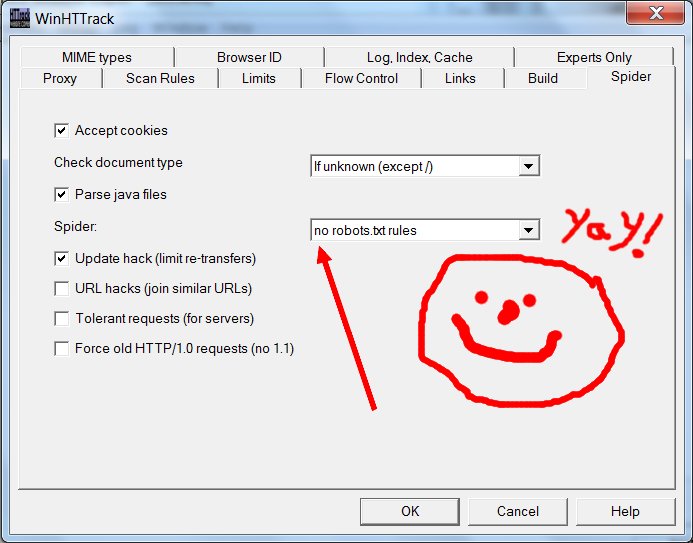
I’ve pointed arrows at three optional settings tabs that you may want to adjust, and at the one mandatory options tab where you must change a setting. I’m going to ignore the optional ones for now, except to say that you would tinker with these if you wanted to change the sorts of media files you’re saving beyond the basic .gif, .jpg, and .png (you’d need to do this if you were saving a Tumblr that had .wav files or .zip files or .mp3s), or if you need to limit this program from slamming your internet connection too hard. It’s the mandatory “Spider” tab you really need to click:
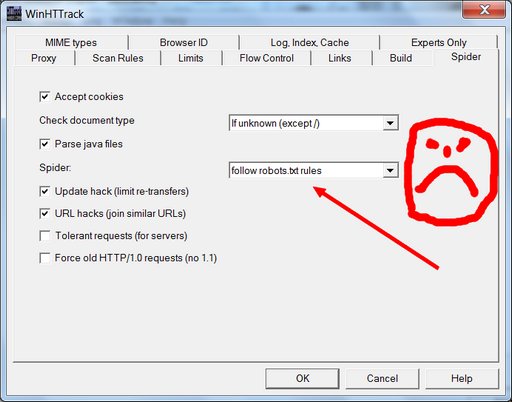
See the box where it says “follow robots.txt rules”? That robots.txt they’re talking about is the very same unwelcome bugger that got us into this mess in the first place. As a general proposition, one should usually instruct one’s electronic robot spider minions to follow robots.txt rules; unruly robot spiders are a menace to the internet and to web servers everywhere. But this principle of polite internet behavior assumes that you haven’t had your own data locked behind the hostile barbed wire of some corporate data-silo forced-labor camp where the robots.txt has been put in place to hide your porny visage so that the corporate camp commissars will look prettier in the pages of Forbes Magazine and the Wall Street Journal. When it’s your data, you’re perfectly within your moral rights to ignore the robots.txt in order to extricate it; and so that’s what we’re going to do here. Change it using the drop-down menu to say “no robots.txt rules”.
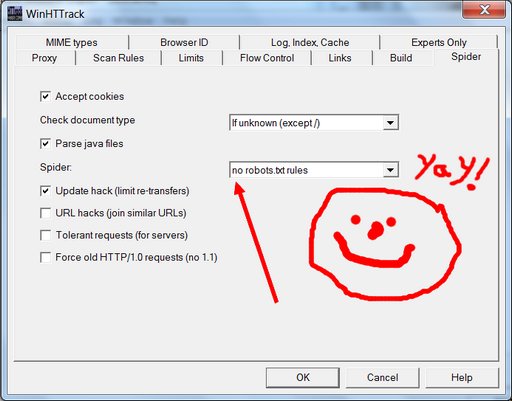
Yay! We’re almost done. Hit the “OK” button, hit “Next”, hit “Finish”, and your site copying should begin.

How long it will take to finish depends on the available bandwidth of your net connection, the memory and processing speed of your computer, and on whether you tweaked any of the options that control things like how many simultaneous connections your computer is making and how many files it’s trying to download in parallel. It also depends on how many pages there are on the Tumblr blog you are backing up, and on how big the images are. The default settings seem to be fairly gentle about not maxing out your internet connection or putting an unruly amount of strain on the server at the site you are trying to copy. Using default settings and a fairly crappy internet connection, I downloaded a test adult Tumblr blog (with permission of the blogger) in about two hours, that had roughly a thousand posts and took up about three-quarters of a gigabyte of room on my hard drive. Your mileage may, and probably will, vary.

What does success look like? You’ll have a folder on your hard drive with the name you provided on the first options screen. If you open it, you will find many sub-folders, and much that may seem mysterious. You should also find a file called “index.html” — and if you click on it, it should open in a new browser window where you’ll be looking at your backed up Tumblr site, using nothing but the files on your hard drive.

What have we not accomplished? Well, you’ve made what should be a full and true copy, but it’s not a nice clean export in some standard format that you could use to easily import all your posts into another content management system or blogging tool. HTML files and related images are scattered through a system of directories and subdirectories that, while logical, may not be the simplest thing to work with. Using the data you’ve got, a clever computer person could generate an XHTML document (or something similar) that could be semi-automatically imported into (say) WordPress. But it would take parsing; it would take work. Figuring out how to take the copy you just made and turn it back into a non-Tumblr website is a solvable problem, but how easy or hard it might be to actually do it depends on your access to computer expertise and tools. For now, you’re safe in the knowledge that you’ve got all the posts you’ve made this past however-many years. You’ve got the images, you’ve got their metadata (any tags you set for them and any credits you may have reblogged or included) and you’ve got the clever things you said about them, all, safe on your hard drive.

Now would be a good time to back up your hard drive. I’m just sayin’.

Partial/Easier Tumblr Backup Solution:

Perhaps all the above is too involved or too complex for you. Or maybe you tried, and failed. For you, there’s a simple little web tool called Backup Jammy where you just type your desired URL into the box and press “Go”. That’s it. A single huge web page appears on your screen with all your Tumblr post content in a simplified format. Then you can use your browser’s “Save as web page” function to save it to your hard disk.
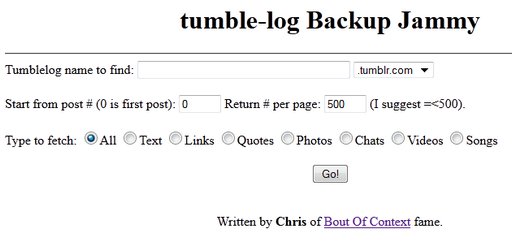
I don’t really recommend this tool. It doesn’t save nearly as much data as HTTrack/WinHTTrack does. In particular, all you seem to get is the standardized Tumblr 500-pixel versions of your images, and none of the higher-res versions that you may have posted. And if you have more posts than will fit in the memory of your computer at one time, you will have to do this in chunks, and save the chunks with appropriate names so you don’t overwrite one with another. It’s a less-complete solution. However, it’s also much easier, especially if your Tumblr blog only has a couple of hundred posts. And it might be enough for you. Certainly it’s better than nothing.

Conclusion

Given the existential threat that the adult Tumblr ecosystem is facing, I hope that smarter people than me will soon take some of the many fine website copying/mirroring tools that are out there, and meld them with friendly idiot-resistant interfaces and powerful parsing tools in a way that provides a seamless Tumblr export in a standardized format that’s ready for import into other blogging tools and posting on other social media platforms. I very much hope so, anyway. But that won’t happen today. A crufty backup you make today is worth a thousand times more than a perfect backup you never make before the platform goes down or is nerfed into uselessness or puts up filters to prevent the users from spidering their own content.

I’m painfully aware that the adult Tumblr backup solutions I’m offering here are messy, imperfect, and incomplete. All I can say in my defense is that they are the very best that I could find and test and describe and put up on the web in a single working day. For many of you, the Tumblr backup options listed here won’t be satisfactory or sufficient, and I apologize in advance for that. But if even a few of the great porn Tumblrs that went dark to public searching in the last few weeks are saved now and preserved on a hard drive and someday returned to the public web because of today’s effort, I’ll count it a day very well spent.

Similar Sex Blogging:

 
May 19th, 2013 -- by Bacchus

How To Search Your Adult Tumblr Blog

The full implications of Tumblr making adult-flagged porn Tumblr blogs non-searchable, and hiding their content from the search engines, are only just starting to sink in for people.

For instance: if you have an adult tumblr, now you can’t even search your own blog to find an old post.

I’m getting panicky emails from people with huge adult Tumblrs, thousands of posts. Apparently internal Tumblr search has never worked well (you can search for one tag, or for blog names, but not for post content and there are no multi-keyword searches) and it’s impractical to scroll back very far in your own Tumblr dashboard. So they were in the habit of typing [keyword] [their own tmblr url] into Google, and hey presto! There would be the post they were looking for.

Now their blogs have a non-consensual robots.txt file that excludes Google, and all of those search results are gone from Google.

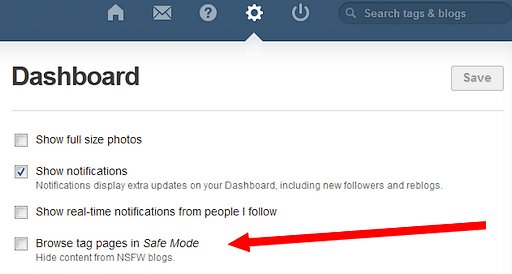
Worse yet? Tumblr blogs flagged “adult” aren’t searchable even with Tumblr’s own internal search. You can test this yourself. Log into your Tumblr dashboard, go to your settings, and make sure you haven’t checked the “Browse tag pages in Safe Mode (Hide content from NSFW blogs)” setting:

setting for allowing yourself to search NSFW-flagged (but not adult-flagged) Tumblr blogs

Unlike the one that doesn’t actually “allow search engines to index your blog”, this checkbox appears to actually work in the narrow sense that if it is not checked, you can search for blogs flagged “NSWF” within the Tumblr tag search interface. But this checkbox lies by omission. You’ve got the option to search tag pages of NSFW blogs (or not) but opting to search them does not let you search blogs that have the deeper-level-of-perdition “adult” flag.

My test for this is to search for a recent post at Wicked Knickers, which I used as my “adult” flagged example in the Thou Shalt Not Search Adult Tumblr Blogs post:

a recent sample post from Wicked Knickers

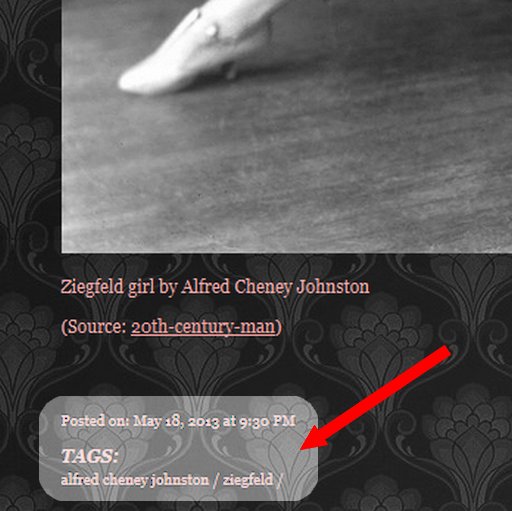
The post we will be looking for in the Tumblr dashboard tag search has a time stamp of 9:30pm yesterday, May 18, and is tagged “ziegfeld” which makes it a nice handy and recent thing to search for.

date and tags on wicked knickers sample post

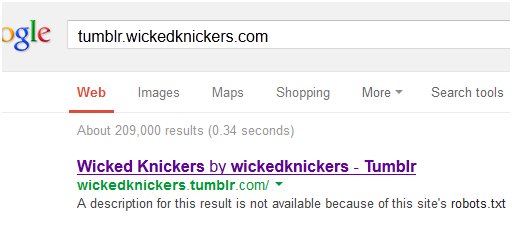
We already know that Google no longer has access to the posts on an adult-flagged Tumblr like this:

wicked knickers posts no longer in Google

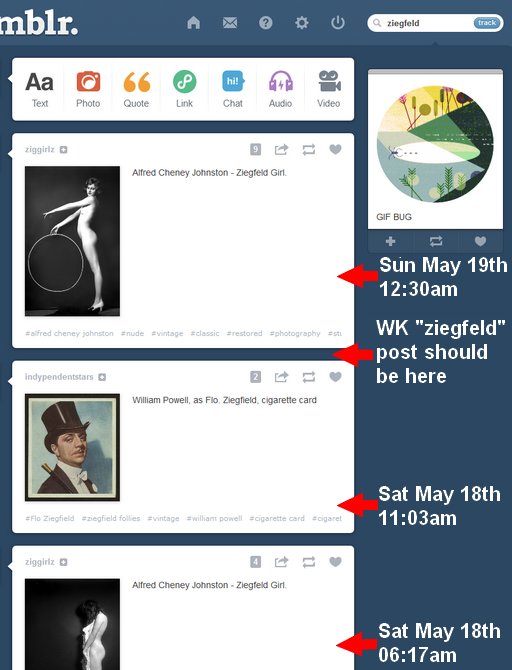
So, what happens in the Tumblr tag search interface? If you’re logged in, this is what you see when you search for tumblr posts with the “ziegfeld” tag. The posts returned are listed in date order (most recent first) and dates are visible as tooltips on the live page, so I’ve added them in the margin with red arrows and white text. You’ll see that the Wicked Knickers post is not returned by the Tumblr search:

searching for a tagged post from adult-flagged tumblr blog

Interestingly, that logged-in Tumblr dashboard search result is displayed at a URL ( http://www.tumblr.com/tagged/ziegfeld ) that returns something very different (but still no sign of our Wicked Knickers post) if you navigate to it as a not-logged-in person:

what Tumblr shows on a tag search to the open web

Try it yourself if you’ve got an adult-flagged Tumblr blog. Log in and try to search for your own posts in the search box on your own dashboard. You will, sadly, fail.

So, what is to be done? How can you search your own Tumblr blog?

The answer is, quite simply, you cannot — not while it’s on Tumblr’s server behind their robots.txt that you do not have the power to alter or remove.

But, all is not lost. Be ye not in despair. If you could only back up your adult Tumblr blog — make a complete copy of it, on your local hard drive — you could search it there with any file searching tool. Or, if you have a web server of your own, you could upload that copy (mirror it) onto your own web space, where it would once again be indexed and searched by Google.

That’s all I got. It’s the only way. It’s also a very good idea, because eventually The Pornocalypse Comes For Us All, and because Anything Worth Doing On The Internet Is Worth Doing At Your Own Domain That You Control.

Your next logical question is “But how do I do that? How do I back up a Tumblr blog?”

It’s not a simple question. The answer isn’t simple either. But, it can be done. So, that’s my next post.

Similar Sex Blogging:
 
May 17th, 2013 -- by Bacchus

Yahoo To Buy Tumblr?

As Tumblr users leave comments on my Thou Shalt Not Search Adult Tumblr Blogs post, it’s becoming clearer that the new robots.txt that prohibits search engines from indexing adult Tumblrs is quite new. But nobody seems to know precisely why Tumblr is newly trying to hide all its adult blogs, and Tumblr still hasn’t responded to my inquiry.

Well, here’s a Time report that Tumblr is in talks to be acquired by Yahoo for big bucks. A potential acquisition like that would certainly explain the urge to scratch kitty litter hastily over the porn that made your system big enough to sell in the first place:

Internet icon Yahoo! is in talks to buy New York-based social blogging platform Tumblr for as much as $1 billion, according to multiple reports. At that price, Tumblr would be pretty expensive, given that it reportedly only booked $13 million in revenue last year, but the deal could still make sense for Yahoo! That’s because Tumblr is extremely popular with the 18-to-24 year-old-set, precisely the demographic CEO Marissa Mayer is targeting as she attempts to turn the purple-hued Internet pioneer around following a multi-year slump.

It’s like I said in The Pornocalypse Comes For Us All:

But Tumblr is, famously, a popular platform in search of a revenue-generating business model. And we’ve learned that the suits have no loyalty to the porn users who made their platform popular. So, my bold prediction is that as Tumblr casts about for a business model, one of their steps will be to “clean this place up” (for the VCs, for the advertisers, for the potential buyers, for somebody). A lot more porn tumblrs will go away when that happens.

The pornocalypse comes for us all.

Note well: Yahoo itself is no friend to adult content. As early as 2001 Yahoo started hiding adult Yahoo Groups from its own directories and site search, making them very hard to find. And adult Yahoo Groups used to be (it’s been some years since I stopped paying attention) frequently deleted, seemingly at random and without any notice or hope of appeal, forcing the group members to reconstitute themselves on other services or in new, temporary, Yahoo groups. If Yahoo buys Tumblr, the adult Tumblr ecosystem is in for a rough ride.

Update:

According to sources close to the situation, the Yahoo board plans to meet Sunday night to decide whether to approve a $1.1 billion all-cash offer for New York-based blogging site Tumblr.

Update, via Violet Blue’s sex news:

If Yahoo Buys Tumblr, What Will It Do With All That Porn? (Businessweek)

Similar Sex Blogging:

 
May 15th, 2013 -- by Bacchus

Thou Shalt Not Search Adult Tumblr Blogs

If you’ve got an adult blog on Tumblr, there’s a good chance Tumblr uses robots.txt to exclude the search engines from indexing it. Did you know that?

Two weeks ago in The Pornocalypse Comes For Us All, I wrote:

Who is next? My guess would be Tumblr. Tumblr is, of all the big platforms, perhaps the most porn friendly; there’s lots of porn on there and the Terms of Service do not prohibit it… But Tumblr is, famously, a popular platform in search of a revenue-generating business model. And we’ve learned that the suits have no loyalty to the porn users who made their platform popular. So, my bold prediction is that as Tumblr casts about for a business model, one of their steps will be to “clean this place up”…

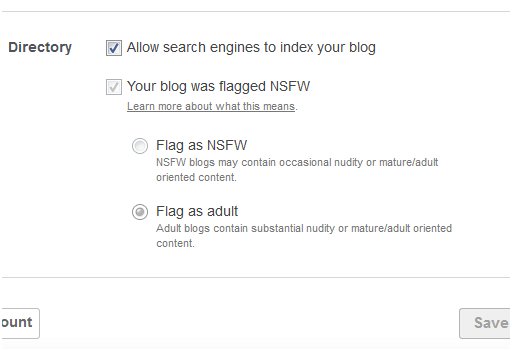
And now, guess what? I’ve discovered that Tumblr uses robots.txt to bar all search engine access to blogs flagged as adult. If you’ve got an adult Tumblr, go look at your own settings. Do you see that first checkbox, the one that says “allow search engines to index your blog”?

misleading tumblr settings showing adult blogs as visible to search engines when they are not

That checkbox is a lie. It’s nicely checked, it’s not greyed out, but if your blog is flagged “adult” it’s a lie. Do you see the “Learn more about what this means” link under “Your blog was flagged NSFW” selector? It leads to this page, where Tumblr requests users to appropriately self-flag their blogs:

Please respect the choices of people in our community and flag your blog as NSFW or Adult from your blog Settings page.

  • NSFW blogs contain occasional nudity or mature/adult-oriented content.
  • Adult blogs contain substantial nudity or mature/adult-oriented content.

If you’re not sure if you should flag your blog you can leave it unflagged, but keep in mind that we might flag it later if we see a lot of mature/adult-oriented content.

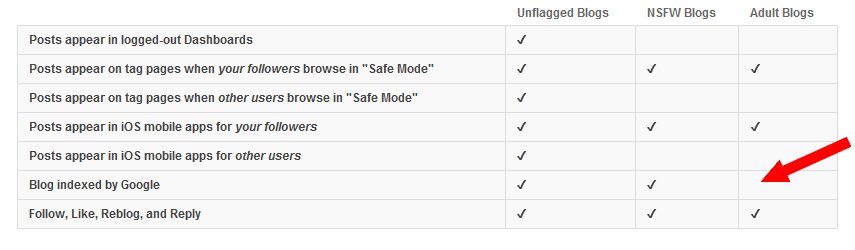
To answer the question “What happens to blogs that are flagged NSFW or Adult?” Tumblr offers this handy chart. The key piece of information is the white space indicated by my red superimposed arrow:

tumblr chart showing that adult blogs are not indexed by Google no matter what preference the user has expressed

That’s right — where the “Blog indexed by Google” row intersects the “Adult Blogs” column, we find a ringing silence.

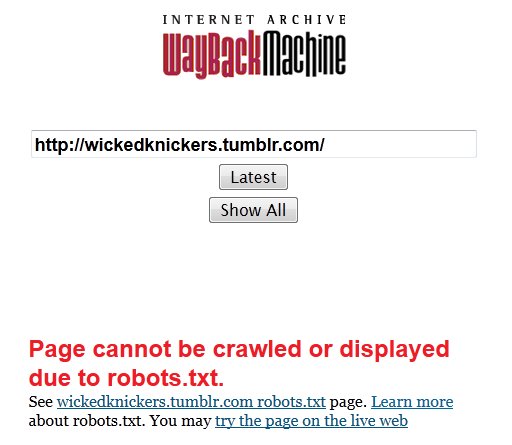
Would you have noticed? None of the adult Tumblr bloggers I know ever did. I knew from my porn researching that adult Tumblrs tended to be poorly represented in Google search results, but I chalked it up to the sheer scale of Tumblr and Google’s growing bias against returning porn search results. Nope, I found out the truth in one stark moment of astonishment, summed up by this image:

Internet Archive Wayback Machine page showing a Tumblr blog where robots.txt is blocking access

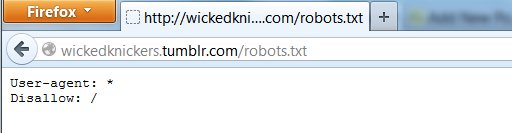
Let’s click the “See wickedknickers.tumblr.com robots.txt page” link:

a sample robots.txt for an adult tumblr showing that all user agents are forbidden

From me: Aghast. Fucking. Gulp.

In robot, that means, roughly “All robots: stay out!” No search spiders allowed. No Internet Archive crawler. The Wicked Knickers tumblr is there, but you have to know about it, or you have to be linked to it. You won’t find it in Google, you won’t find it in any other search engine that honors robots.txt, and when Tumblr decides to stop hosting it, you won’t find the pages in the Wayback Machine — it will be gone for good, lost to humanity unless somebody with the technical chops and outlaw sensibilities of Archive Team finds a way to archive it anyway, robots.txt be damned.

Wicked Knickers is just an example, one that has some meaning to me because it’s one of the first Tumblr blogs I ever noticed, and I’ve been linking to it since 2010. That’s almost 6,000 vintage erotica posts since January 2009, and none of those pages are in Google or the Wayback Machine. It was only when I twigged to that anomaly that I finally understood what Tumblr is doing to adult blogs.

In all the years that I’ve been preaching Bacchus’s First Rule (“Anything worth doing on the internet is worth doing on your own domain that you control”), I’ll confess that I never considered the power of robots.txt, or what it means to be putting stuff on an internet site where somebody else controls what robots.txt says. Not only do they control your visibility to search engines, they control whether history will remember what you said. That strikes me as a high price to pay for a “free” blogging platform.

It’s worth noting that there’s still rather a lot we don’t know about the Tumblr robots.txt blockade on adult Tumblr sites. Unanswered questions include:

  • Does Tumblr have any flexibility on this? Would their support, if asked, remove or modify the robots.txt barrier in specific cases?
  • When did Tumblr start using robots.txt to block Google from adult blogs? Has it always been like this, or is it a recent innovation?
  • Why does Tumblr display the misleading checkbox that falsely implies that search engines can see flagged adult blogs?
  • What is the actual reason for excluding adult Tumblrs from search engine and (especially) archive crawls?

In an unusual move for me, I actually reached out to press@tumblr.com, told Tumblr I was going to write this post, and asked them for answers to those questions. That was on May 11th. No response so far. If they ever do answer, I’ll be sure to update this post.

Similar Sex Blogging:
 
November 26th, 2012 -- by Bacchus

Look! No Hands!

You gentlemen will appreciate how rare it is to ejaculate (while awake) without any stimulation of the penis. But it is possible, especially when the prostate is being pressed upon properly. This pair of animated .gifs show how one man does it with a dildo up his ass and some careful athletics:

Hands-Free Masturbation And Ejaculation

2019 update: This link originally went to Tumblr, and broke in the Great Tumblr Pornocalypse Fire of 2018. Fortunately, the Internet Archive’s WayBack Machine had preserved a copy.


cupid